Pirma dalis
Part one
Kas yra Omarchy Linux?
What is Omarchy Linux?
Omarchy — Davido Heinemeier Hanssono (DHH, 37signals) sukurta Linux darbo aplinka, paremta Arch Linux ir Hyprland kompozitoriumi. Tai nėra dar viena distribucija su savo paketų tvarkykle: tai kruopščiai suderintas ir sąmoningai „turintis nuomonę“ rinkinys, kuriame langai klojami plytelėmis, viskas valdoma klaviatūra, o terminalas yra darbo centre.
Omarchy is a Linux desktop built by David Heinemeier Hansson (DHH, 37signals) on top of Arch Linux and the Hyprland compositor. It is not another distribution with its own package manager: it is a carefully tuned, deliberately opinionated setup where windows are tiled, everything is driven from the keyboard, and the terminal sits at the centre of the work.
Sistema platinama kaip paruoštas ISO atvaizdis su visu rinkiniu — kompozitoriumi, juosta, paleidikliu, terminalu, redaktoriumi ir numatytosiomis temomis. Užuot valandas derinus konfigūracijas, gaunate veikiančią aplinką iš karto, o keisti galite viską.
It ships as a ready ISO image with the whole set — compositor, bar, launcher, terminal, editor and default themes. Instead of spending hours wiring configs together, you get a working environment immediately, and everything remains changeable.
Arch Linux pagrindas
Built on Arch Linux
Nuolatinis atnaujinimų srautas (rolling release), pacman ir AUR. Naujausios paketų versijos be distribucijos versijų šuolių.
A rolling release, pacman and the AUR. Current package versions without distribution-wide version jumps.
Hyprland ir Wayland
Hyprland and Wayland
Langus klojantis Wayland kompozitorius su sklandžiomis animacijomis, darbalaukiais ir tvarkingai suderintomis klavišų kombinacijomis.
A tiling Wayland compositor with smooth animations, workspaces and a coherent set of key bindings.
Klaviatūra pirmiausia
Keyboard first
Visa sistema pasiekiama meniu Super + Alt + Space ir paleidikliu — pelė reikalinga retai.
The whole system is reachable through the Super + Alt + Space menu and the launcher — the mouse is rarely needed.
Temos ir papildiniai
Themes and plugins
Viena komanda įdiegiamos temos ir Quattro juostos papildiniai, keičiantys visą sistemą iš karto.
Themes and Quattro bar plugins install with a single command and restyle the whole system at once.

Darbalaukis: juosta viršuje, darbalaukiai kairėje, sistemos būsena dešinėje.
The desktop: bar on top, workspaces on the left, system status on the right.
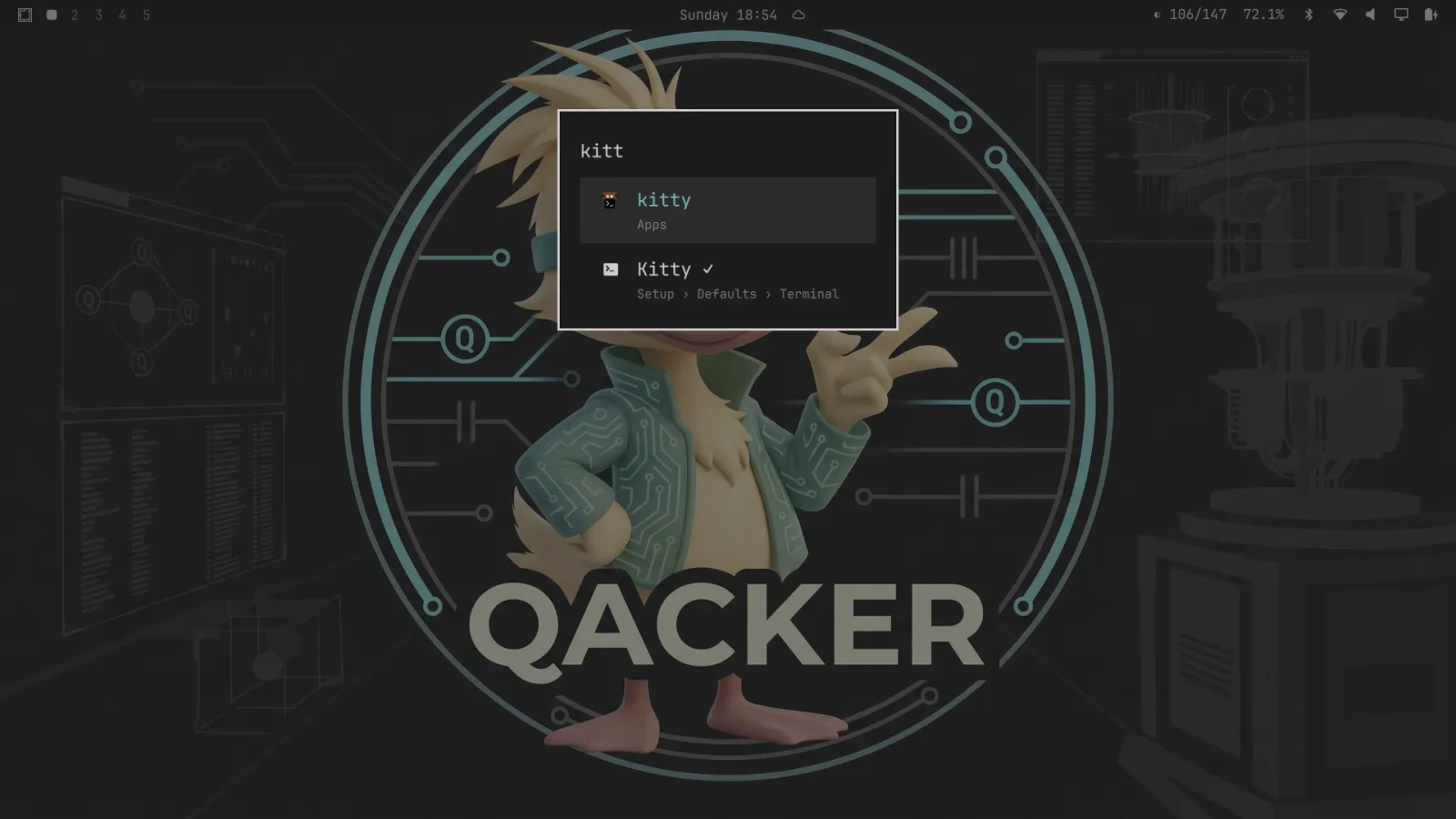
Paleidiklis: programos, nustatymai ir veiksmai vienoje paieškoje.
The launcher: apps, settings and actions in one search box.
Nuo Omakub prie Omarchy
From Omakub to Omarchy
Prieš Omarchy buvo Omakub — ta pati idėja Ubuntu ir GNOME aplinkai: viena komanda tvarkingai sukonfigūruoja naują sistemą programuotojo darbui. Pasirodė, kad Ubuntu ir GNOME per daug priešinasi klojamų langų ir klaviatūra grįstam darbui, todėl kita karta pastatyta ant Arch ir Hyprland. Omakub šiandien archyvuotas, o bendruomenė tęsia jį kaip Omabuntu.
Before Omarchy there was Omakub — the same idea for Ubuntu and GNOME: one command turns a fresh system into a configured developer setup. Ubuntu and GNOME turned out to push back too hard against tiling and keyboard-driven work, so the next generation was built on Arch and Hyprland instead. Omakub is archived today, and the community continues it as Omabuntu.
Bendruomenė
Community
Omarchy LT
Omarchy LT — neformali lietuvių entuziastų grupė, kasdien dirbanti su Omarchy ir pritaikanti ją sau. Neturime nei narystės, nei mokesčių: dalinamės tuo, ką patys pasidarome, ir padedame tiems, kas tik pradeda.
Omarchy LT is an informal group of Lithuanian enthusiasts who work with Omarchy daily and adapt it to their own needs. There is no membership and no fee: we share what we build for ourselves and help those who are just starting.
Ką darome
What we do
- Temos ir spalvų schemos visai sistemai
- Themes and colour schemes for the whole system
- Papildiniai Quattro juostai
- Plugins for the Quattro bar
- Konfigūracijos ir dotfiles
- Configurations and dotfiles
- Pagalba diegiant ir lietuviškos instrukcijos
- Install help and Lithuanian documentation
Projektai šiame puslapyje
Projects on this page
- Emacs Org Mode tema — viena paletė visai sistemai
- Emacs Org Mode theme — one palette for the whole system
- tor.lt papildinys — katalogo būsena juostoje
- tor.lt plugin — directory status in the bar
Prisidėti
Contributing
Viskas atviro kodo ir laikoma GitHub. Klaidos pranešimai, pataisymai ir naujos temos laukiami — atidarykite issue arba pull request.
Everything is open source and kept on GitHub. Bug reports, fixes and new themes are welcome — open an issue or a pull request.
Projektas 01
Project 01
Emacs Org Mode tema
Emacs Org Mode theme
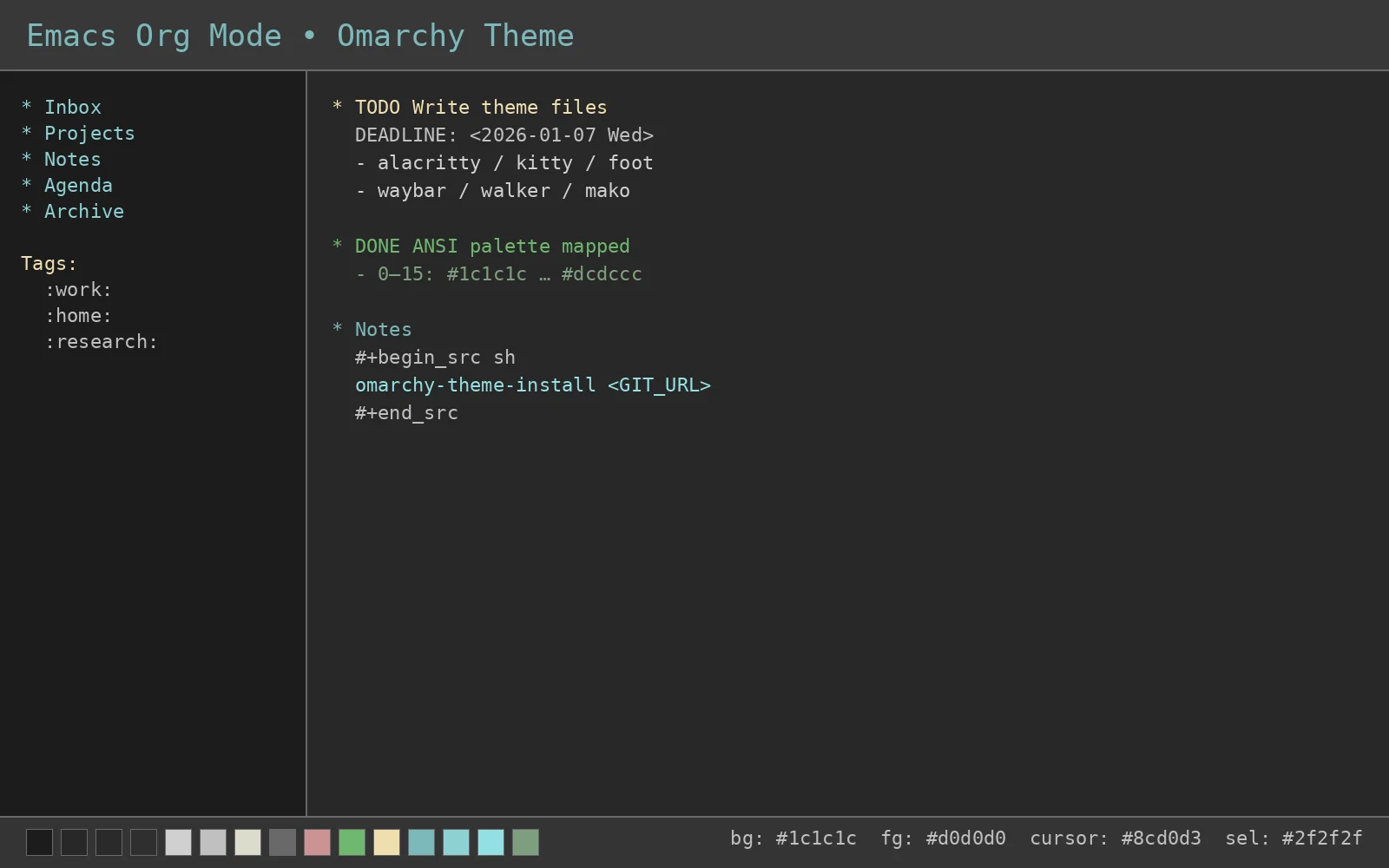
Spalvų schema, įkvėpta Emacs Org Mode estetikos ir išplėsta visai sistemai: terminalams, redaktoriams, darbalaukiui ir programoms. Tamsus pagrindas su ramiais žalsvai mėlynais ir žaliais akcentais — kad akys nepavargtų po ilgo darbo, o tekstas išliktų aiškus.
A colour scheme inspired by the Emacs Org Mode aesthetic and extended across the whole system: terminals, editors, the desktop and applications. A dark base with calm cyan and green accents — easy on the eyes over a long session, while keeping text legible.
Kur veikia
Where it applies
Terminalai
Terminals
- Alacritty
- Kitty
- Foot
- Ghostty
Redaktoriai
Editors
- VS Code
- Neovim
- Emacs (natyviai)
- Emacs (native)
Darbo aplinka
Desktop
- Hyprland
- Waybar
- GTK programos
- GTK applications
- Pranešimai (Mako)
- Notifications (Mako)
Programos
Applications
- Firefox
- Chromium
- Discord (Vencord)
- btop, cava
Spalvų paletė
Colour palette
Diegimas
Installation
Būdas 1: tiesiogiai iš Git
Method 1: straight from Git
Įdiekite tiesiai iš GitHub saugyklos:
Install directly from the GitHub repository:
omarchy-theme-install https://github.com/Grigaliunas/omarchy-emacs-org-mode-theme
Būdas 2: rankiniu būdu
Method 2: manual
git clone https://github.com/Grigaliunas/omarchy-emacs-org-mode-theme ~/.config/omarchy/themes/omarchy-emacs-org-mode-theme
Super + Alt + SpaceSuper + Alt + SpaceStyle > ThemeStyle > ThemeEmacs Org ModeEmacs Org ModeANSI spalvų lentelė
ANSI colour reference
0  #1c1c1c   8  #282828
1  #cc9393   9  #cc9393
2  #6fb86f   10 #7f9f7f
3  #f0dfaf   11 #f0dfaf
4  #7cb8bb   12 #8cd0d3
5  #8cd0d3   13 #93e0e3
6  #93e0e3   14 #7cb8bb
7  #d0d0d0   15 #dcdccc
Projektas 02
Project 02
Katalogo būsena Omarchy juostoje
Directory status in the Omarchy bar
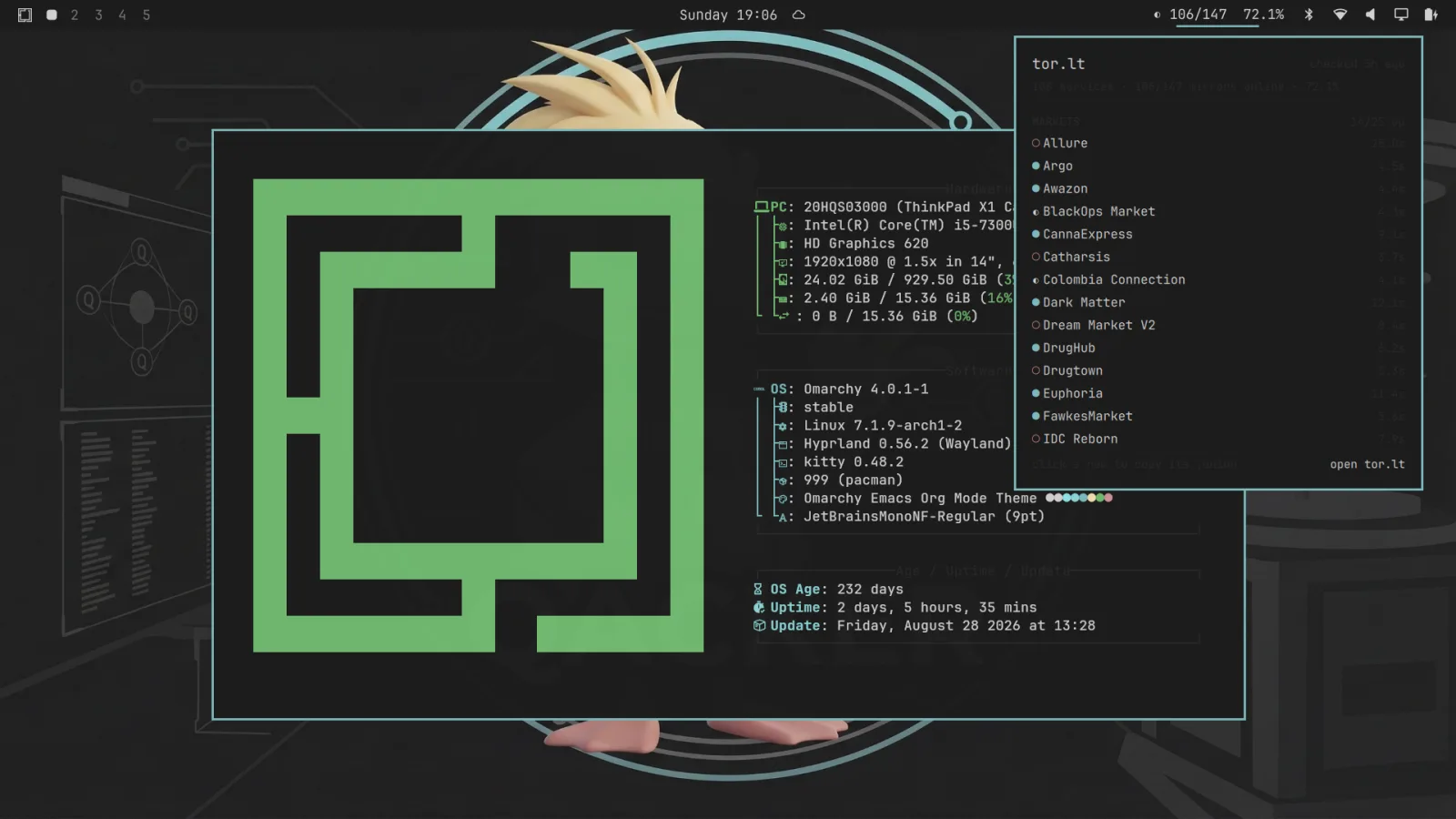
Quattro juostos valdiklis, skaitantis /status.json iš tor.lt: kiek veidrodžių pasiekiama iš viso, kategorijų suvestinė paspaudus ir adreso kopijavimas vienu paspaudimu. Skirta paslaugų pasiekiamumo stebėsenai — tyrimams ir situacijos suvokimui.
A Quattro bar widget reading /status.json from tor.lt: online mirrors out of total, a category breakdown on click, and click-to-copy for any address. Built for availability monitoring — research and operational awareness.
Juostoje, be atskiro lango
In the bar, no window to open
Bendras pasiekiamumas matomas juostoje visą laiką — 106/147, 72.1%. Nereikia nieko atidaryti.
Live availability sits in the bar at all times — 106/147, 72.1%. Nothing to open.
Suvestinė pagal kategorijas
Per-category breakdown
Paspaudus išsiskleidžia sąrašas: kiekvienai kategorijai — veikia / iš viso, kiekvienai paslaugai — atsako laikas.
Clicking expands the list: up/total per category, and response latency per service.
Kopijavimas vienu paspaudimu
Click to copy
Paspaudus eilutę, jos .onion adresas nukopijuojamas per wl-copy.
Click a row to copy its .onion address via wl-copy.
Nustatoma
Configurable
Apklausos intervalas, duomenų adresas ir laukimo laikas keičiami konfigūracijoje.
Poll interval, endpoint and timeout are all configurable.
Diegimas
Installation
unzip torlt-omarchy-plugin.zip -d ~/.config/omarchy/plugins/
| Identifikatorius | Plugin ID | grigaliunas.torlt |
|---|---|---|
| Versija | Version | 1.0.0 · 10 KB |
| Duomenų šaltinis | Data source | https://tor.lt/status.json |
| SHA-256 | 2362a01c77af72d44dbbcf0af641cf88305e3cf5d817d4e39c119c05e8cd0faa |
Pastaba. Papildinys rodo tik pasiekiamumo statistiką ir nepakeičia Tor Browser apsaugų — jis sprendžia maršrutizavimo, o ne pirštų atspaudų klausimą. tor.lt katalogas skirtas tyrimams ir situacijos suvokimui; paskirties vietas visada tikrinkite patys.
Note. The plugin shows availability statistics only and does not replace Tor Browser's protections — it addresses routing, not fingerprinting. The tor.lt directory is for research and operational awareness; always verify destinations yourself.